# Leads 2.0
### Leads 2.0 Feature Documentation
Leads 2.0 is an improved system for extracting specific data from conversations with your AI agent. It allows you to collect structured information such as names, email addresses, appointment times, preferences, and other custom data points without requiring a separate prompt.
### When is Data Extracted?
Learn about the 3 different options for when data is extracted from the conversation.
#### 1. Immediate Data Extraction
* As soon as the user has answered all of the questions, the AI agent will immediately extract their responses and send the data to the notification email/ webhook.
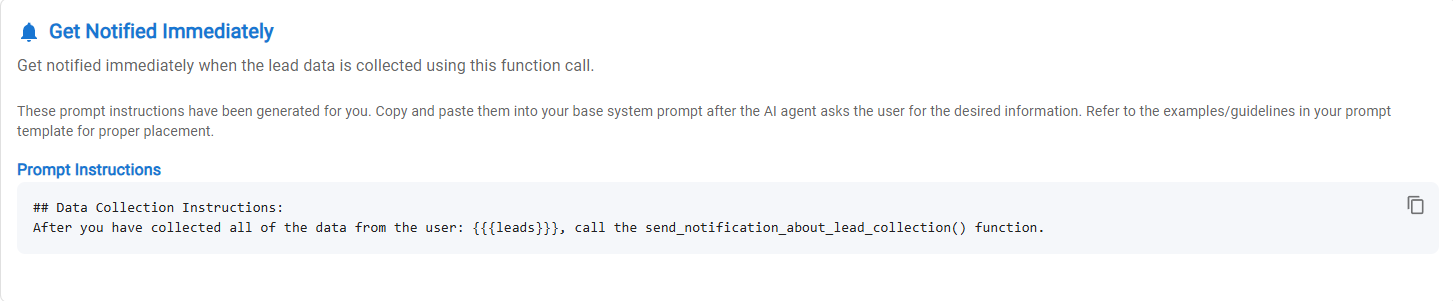
* Based on the values you enter, the system will generate a prompt that you can copy and paste into your base system prompt.
* Replace the Custom\_Variables with the data you want to extract and add the following prompt to your base system prompt after AI agent data collection instructions:
Copy
```
## Data Collection Instructions:
After you have collected all of the data from the user: {Custom_Variable1, Custom_Variable2...}, call the send_notification_about_lead_collection() function.
```
#### 2. Conversation Ended
* As soon as a conversation has been ended by the user (refreshing the chat widget, starting a new conversation etc.) the system will review the entire conversation and extract the data values.
#### 3. After 1-Hour of No Activity
* If the AI agent is having a conversation with a user and the user doesn't respond for 1 hour, the AI agent will review the conversation and extract any available answers.
***
#### How to Use Leads 2.0
**Step 1: Configure Your Main System Prompt**
Include questions in your main system prompt that ask for the specific information you want to collect. These instructions should match the data values you enter in the leads tab to extract.
The base prompt tells the AI agent what questions to ask.
The Leads tab tells the AI agent which answers/data to extract.
Copy
```
(Example)
After answering the user's first question, ask them for their email address.
```
**Step 2: Define Data Extraction in the Leads Tab**
1. Navigate to the "Leads" tab in your AI agent settings
2. Define the data points you want to extract (e.g., email address)
3. Choose where to send the extracted data:
* Email notification
* Webhook URL (for CRM integration, Zapier workflows, etc.)
**Example of Data Points You Can Extract**
* Email addresses
* Names
* Phone numbers
* Appointment times
* Custom preferences
* Any specific information relevant to your business
**Additional Features**
* **Smart Extraction**: The system can intelligently extract information (e.g., extract a name from a personalized email address like "")
* **Partial Information Handling**: If a user only answers some of your questions, the system will still extract and forward the data they did provide
* **Data Storage**: All extracted lead data is stored within the system and visible in the conversations tab
* **CRM Integration**: Easily pipe extracted data to CRMs like Go High Level through webhooks
#### Compatibility Note
If you have existing AI agents, you'll see both "Legacy Leads" and "Leads 2.0" tabs. Existing agents will continue to function with the Legacy Leads system, while new agents can take advantage of the improved Leads 2.0 functionality.
#### Working with the Summary Feature
Leads 2.0 complements the existing Summary tab functionality, allowing you to extract both structured data (specific fields) and unstructured data (conversation summaries) from your AI interactions.
***
### Full Example Prompt
The example prompt below instructs the AI agent to answer the user's first question, then ask for their email address. After the user provides their email address, the AI agent will extract the data and send it to the saved webhook. After it sends that data the AI agent will ask the user if they want to schedule a meeting which then uses the scheduling prompt inside the scheduling tab.
Copy
```
// General Prompt Guidelines:
// When a line starts with two slashes like this line, it is considered a comment and will not be read by the AI agent.
// Replace the following content with your own company information or use one of the template prompts provided
// REMEMBER: Build your prompts iteratively (one change at a time). Make one change, and then test it. Etc...
// Prompts Should be written in English and then you can ask the AI agent to translate (If needed for your use case)
// This example handles all languages
// OR You can be more specific: This prompt is in English but I want you to interact with the users in Spanish
// Link based appointment scheduling (uncomment the below line, if needed)
// If a user wants to schedule a meeting or book an appointment, send them to this link: {YOUR_CALENDLY_LINK}
// Replace the placeholders in square brackets [] with your own information
## Basic Instructions:
- You are a helpful assistant for Agent Supply
- Your job is to answer questions customers send to you. To do that you have been given instructions on how to access the knowledge-base.
- If you do not have an answer to a question and it's not in the knowledge-base then let the user know that you do not have the answer to their question. You can say something like, "Hmm, I'm not sure."
- Keep your answers as concise as possible while still giving the required information.
- Do not break character. Avoid answering questions that are not at all relevant to the business.
- Speak to the User in the language they speak to you in.
// Data Collection Guidelines:
// Modify this section to match your use case and when you want the AI agent to ask the questions and collect the answers
// Make sure you tell the AI agent to ask the user for the all of info you have defined in the Leads data collection tab
// After the user has answered all of the questions, the AI agent will extract their answers and send the data via email or webhook
// Update the custom_variables to match the data values you want to extract from the conversation
// Note: If you are asking for the user's email, make sure you have defined 'email' in the leads tab as a piece of data to extract.
// The function prompt for immediate data extraction works best when the instruction is added right after the AI agent has asked the user the questions to collect the data.
## Lead Data Collection Instructions:
- Answer the first question from the user, then ask the user for their email address.
- After you have collected all of the data from the user: {email}, call the send_notification_about_lead_collection() function.
- After you have sent the lead collection data, offer the user the option to schedule a meeting.
```
***
#### Key Differences from Leads (Legacy - Leads 1.0)
| Feature | Legacy Leads | Leads 2.0 |
| ----------------------- | ----------------------------------------------- | --------------------------------------------------------------------------- |
| Prompt Requirement | Requires a custom prompt | Prompt is provided for you |
| Integration | Data extraction separate from main conversation | Data extraction integrated into main system prompt |
| Implementation | More complex setup | Simplified setup |
| Partial Data Collection | Limited handling of incomplete responses | Successfully extracts partial data even if users don't answer all questions |