> For the complete documentation index, see [llms.txt](https://docs.agentsupply.ai/llms.txt). Markdown versions of documentation pages are available by appending `.md` to page URLs; this page is available as [Markdown](https://docs.agentsupply.ai/ai-features/knowledge-base-explain.md).
# Knowledge Base Explain
The "knowledge base" refers to the business information uploaded to train an AI Agent.
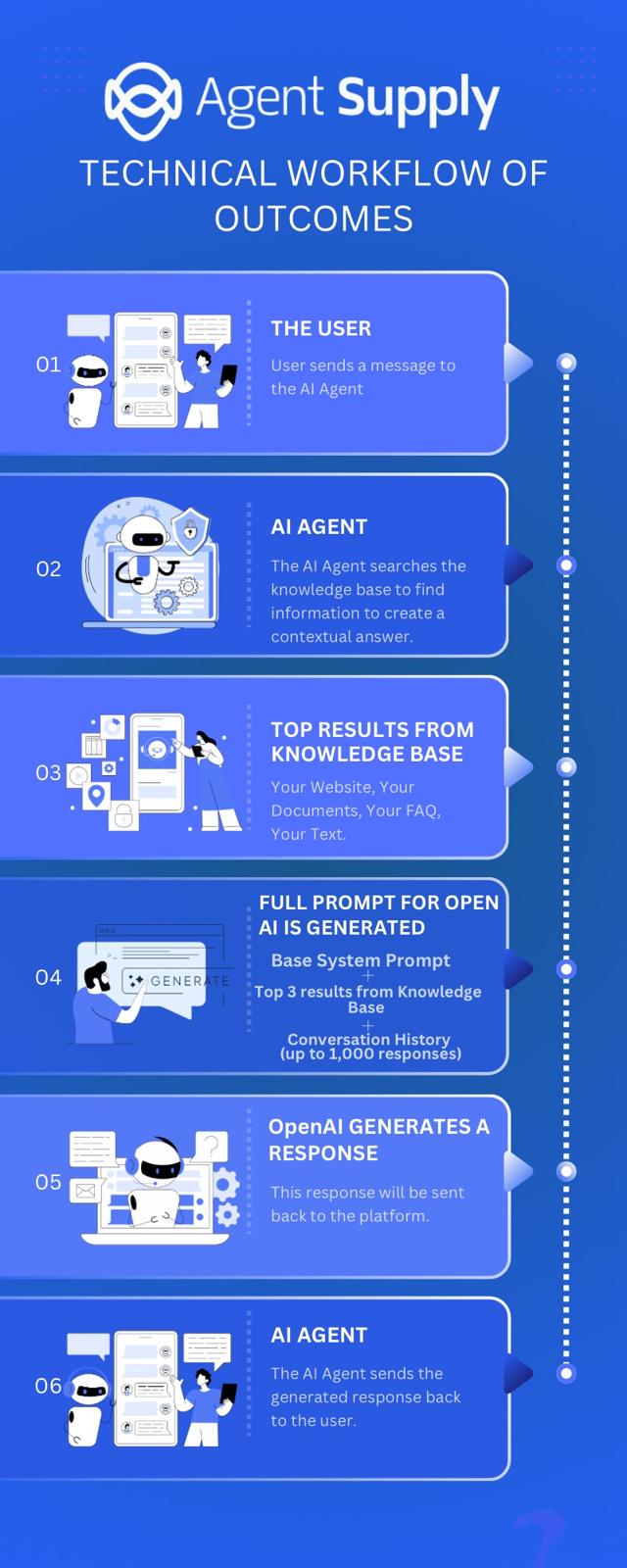
There is a limited amount of room and so the system needs to search through the knowledge base to find relevant information that might help a user's question.
*Technical overview of the* AI Agent
The knowledge base is split up into multiple sections that make it super easy to add the information about your business.
It's important to note that more data is not always better. We recommend that you only add relevant information that helps provide context to the overall conversation.
### Different Data Formats
You can train your AI Agent by utilizing any of the following data formats.
[Copy & Paste Text](/ai-features/knowledge-base-explain/copy-and-paste-text.md)[Upload Documents](/ai-features/knowledge-base-explain/upload-documents.md)[Scrape Websites](/ai-features/knowledge-base-explain/scrape-websites.md)[Question & Answer Pairs](/ai-features/knowledge-base-explain/question-and-answer-pairs.md)
#### Data Storage (Characters)
When you upload information to an AI agent's knowledge base, it will take up a certain amount of characters. Characters are the 'unit' of measurement for storage.
[💽Data Storage (Characters)](/ai-features/knowledge-base-explain/data-storage-characters.md#agency-storage-balance)